
How does USPS Form 1583 work for a business?
USPS Form 1583 for business use runs through a single application: one authorized officer signs the form, the entity’s details go in box 7, and the other people who will receive mail at the box are listed in box 12. That structure comes straight from the June 2024 edition of the form — you check Business/Organization Use in box 3, and footnote 2 directs you to “complete item 7,” the business-information section that residential applicants leave blank.
The rule most people get wrong sits one footnote down. Footnote 3 — “For Residential/Personal Use, complete a separate PS Form 1583 for each adult using this PMB” — is printed under the residential track, not the business track. If you have seen advice that every individual connected to a company mailbox must file their own notarized form, that is the residential rule applied to the wrong box. The form’s own instructions route a business differently: an officer signs the application and provides his or her title, and the members receiving mail are listed on that same application rather than separately filed.
Here is the split, checked line by line against the current form and USPS Domestic Mail Manual 508.1.8:
| Question | Business/Organization Use | Residential/Personal Use |
|---|---|---|
| How many forms? | One application for the entity | A separate PS Form 1583 for each adult using the PMB (footnote 3) |
| Who signs? | An officer signs the application and provides his or her title (footnote 14) | Each adult signs their own form; DMM 508.1.8.3 requires spouses to each complete and sign a separate form |
| Box 7? | Required — entity name, type, address, place of registration | Left blank |
| Other mail recipients? | Listed in box 12; each presents two valid IDs to the Postal Service upon request (footnote 13) | A parent or guardian may list a minor’s name; the minor’s ID is not required |
| Whose ID is attached? | The signing officer’s two IDs, plus an authorized individual’s if one is listed (footnote 9) | Each adult applicant’s two IDs |
One qualifier bounds the whole table: PS Form 1583 sets the USPS floor, and the mailbox provider — a commercial mail receiving agency, or CMRA — can layer its own onboarding requirements on top. Nothing stops a provider from asking for more paperwork than USPS does, so confirm its policy before you decide how many sessions to book.
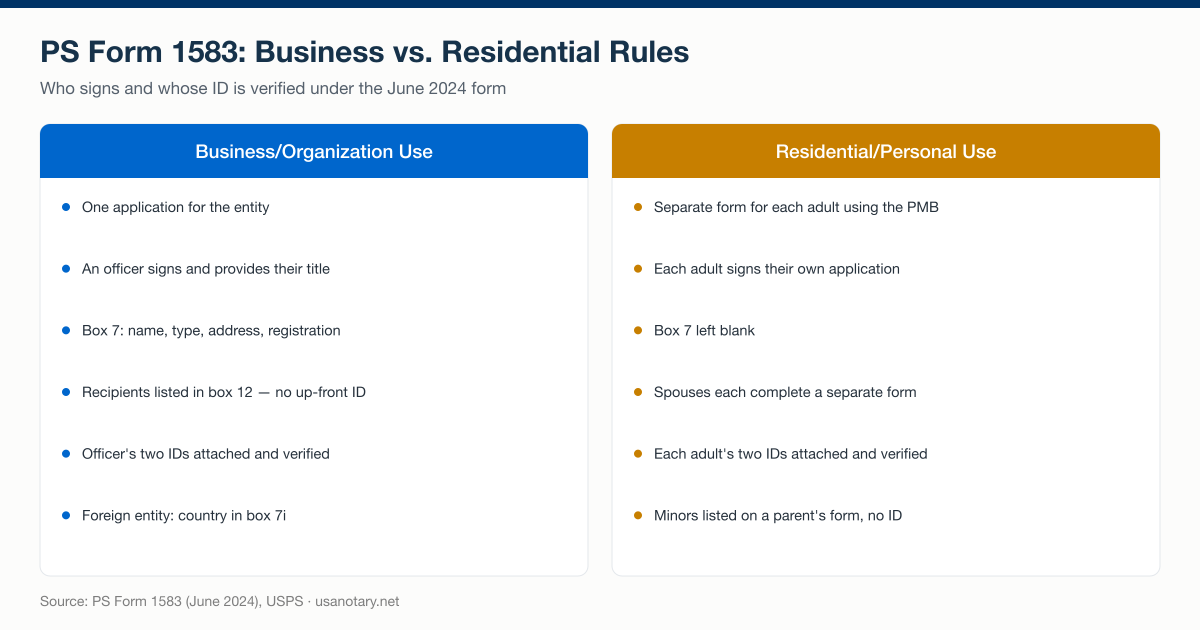
The business and residential tracks of PS Form 1583 (June 2024) side by side — who signs, and whose ID is verified. USPS wording checked October 1, 2026; sources are listed at the bottom of the page.
Who signs Form 1583 for an LLC or corporation?
An officer signs — and the form is explicit about it. Footnote 14 on the June 2024 edition states that “for Business/Organization Use, an officer must sign the application and provide his or her title.” The signature goes in box 13a, the title alongside it, and by signing the officer certifies that all information on the form “is accurate, truthful, and complete,” under penalty of criminal and civil sanctions for false statements.
The form does not define “officer,” and it does not restrict the term to corporations. For an LLC, the practical fit is a person with authority to bind the company — a managing member or manager. For a corporation, any officer (president, secretary, treasurer) fits the printed instruction. Whoever signs should be prepared to sign with their title every time, because an untitled signature on a business application misses what footnote 14 requires.
The officer signs as the applicant
Signing for the entity makes the officer the form’s applicant — which pulls in the personal boxes, not just the business ones. USPS stated the same point in its 2023 final rule: “The applicant on PS Form 1583 is always an individual and they must provide their primary and secondary forms of identification. If the mail received is to be addressed to a business/organization, the applicant must also list the name and address of the business/organization as well as the place (county and state or country) where the business/organization is registered” (88 FR 32112). Box 4 takes the officer’s own name, phone, email, and home street address (not the company’s address, and not the new mailbox). Footnote 4 requires that home address to match the document presented as the address ID in box 9. Boxes 8 and 9 record the officer’s two IDs. A business application is therefore always two identities on one page: the entity in box 7, and the human applicant everywhere else.
Whose ID is verified
Identity verification on a business 1583 attaches to exactly two people, at most. Footnote 9 requires two types of identification “for both the Applicant and, if listed, the Authorized Individual” — one government-issued photo ID, one document confirming the listed address, copies attached. The employees and members listed in box 12 attach nothing: footnote 13 says each person listed “must, upon request, present two forms of valid ID to the Postal Service.” Up-front ID collection for the signer, on-demand ID for the roster — that division is what makes the business track workable at any headcount.
What goes in box 7 of Form 1583?
Box 7 captures the entity, and the June 2024 form asks for exactly nine items. Work through them in order:
- 7a — Name of Business/Organization. The legal name, as registered.
- 7b — Type of Business. What the company does or its entity form.
- 7c — Business Street Address. House number, street, and suite if applicable (footnote 1). This is the company’s real operating address — not the PMB you are applying for.
- 7d–7f — City, State, ZIP + 4.
- 7g — Country. The form provides a country field here because the business address can sit outside the United States.
- 7h — Telephone Number. Include the area code.
- 7i — Place of Registration. Defined by footnote 8 as “the county and state (if domestic), or the country (if foreign).”
Why box 7c matters more than it looks
The address in box 7c feeds a verification the Postal Service reserves the right to run. The form’s instructions state the application “may be subject to verification procedures by the Postal Service to confirm that the applicant resides or conducts business at the home or business address listed in items 4f or 7c.” The DMM puts a matching duty on the provider: under 508.1.8.3, “the CMRA owner or manager must verify the documentation to confirm that the addressee resides or conducts business at the permanent address shown on PS Form 1583.” An entity that lists a placeholder address in 7c is setting up a verification it cannot pass.
Place of registration (box 7i)
Place of registration is the one field on the form that is pure entity law. A domestic company enters the county and state where it is registered; a foreign company enters its country. The field is short, but it is also where a CMRA can see at a glance whether it is onboarding a domestic LLC or a foreign-owned one — which changes what documentation the provider asks for next.
How do you list employees and members who receive mail?
Box 12 — titled “Exceptions for Additional Recipients of Mail” — is where the rest of the company goes. Footnote 13 gives the business-use instruction in one line: “List members who will be receiving mail at this PMB. Each person listed must, upon request, present two forms of valid ID to the Postal Service.” Every name that will appear on an envelope at that box belongs on the list; none of them signs the application, and none of them attaches ID up front.
Additional recipient vs. authorized individual
Two roles on the form sound alike and do different jobs, so pin them apart:
- Additional recipient (box 12): a person whose name appears on mail arriving at the PMB — an employee, a member, a co-founder. Listed by name only; ID is presented to the Postal Service only upon request.
- Authorized individual (box 5): in the form’s own definition, “a person who is authorized to pick up mail for the PMB holder.” This role carries the full ID treatment — boxes 10 and 11 record the authorized individual’s photo ID and address ID under the same two-ID rules as the applicant, copies attached.
A five-person startup where mail arrives addressed to all five, but only the office manager collects it, is one application: the officer signs, four colleagues sit in box 12, and the office manager — if not the signer — is the box 5 authorized individual with two IDs on file.
When the roster changes
The agreement printed on page 2 commits the applicant to keep the form current: “when any information required on this form changes or becomes obsolete, the applicant must file an updated application with the agent.” A new hire who starts receiving mail at the box is a change to box 12, and the fix is an updated application filed with the provider — not a quiet addition to the mail pile. Providers enforce this because DMM 508.1.8 makes the CMRA responsible for keeping a current form on file for every addressee.
Which IDs does the signing officer need?
The officer needs two forms of identification, under the same rules as any applicant. Footnote 9 sets the pair: one must be a government-issued photo ID, and the second must confirm the address the officer listed on the form — the officer’s home address, not the company’s. Copies of both documents are attached to the application.
The June 2024 form prints the acceptable lists in full. Photo IDs (box 8e): a U.S. state, territory, or tribal driver’s or nondriver’s ID card; uniformed service ID; passport; Certificate of Naturalization; U.S. Access Card; Matricula Consular; U.S. Permanent Resident Card; U.S. University ID card; NEXUS card. Address IDs (box 9g): the driver’s/nondriver’s ID card, a current lease, a home or vehicle insurance policy, a mortgage or deed of trust, a vehicle registration card, or a voter card. Footnote 10 adds the trap worth flagging to every signer: the driver’s/nondriver’s ID appears on both lists but “may be used for only one of the IDs (either photo ID or address ID), not for both.” Utility bills appear on neither list. For the full field-by-field session prep — what to fill in before you meet the notary, and what to leave unsigned — see the complete PS Form 1583 walkthrough.
Where the EIN fits
No field on PS Form 1583 asks for an EIN. Box 7 wants the entity’s name, type, address, phone, and place of registration — the form identifies the business by registration, not by tax ID. EIN paperwork enters the picture one step later, at the provider’s discretion: because the CMRA owner or manager must verify documentation confirming the applicant conducts business at the listed address, providers set their own supporting-document lists for business accounts. The IRS CP575 notice — the notice that confirms your Employer Identification Number, which the IRS instructs you to keep in your permanent records and now describes as a digital notice available through its Business Tax Account — is the cleanest EIN evidence a business can offer if its provider asks. Formation documents serve the same corroborating role for the box 7i place of registration. Neither is a USPS requirement on the form itself; both are worth having in the same folder as the two IDs.
How does a foreign-owned LLC complete Form 1583?
A foreign-owned LLC completes the same application, and the June 2024 form anticipates it in three places. The photo-ID checklist in box 8e lists “Passport” with no U.S.-only qualifier — other entries on the same list carry the U.S. prefix, and the list also includes the Matricula Consular. The address fields carry Country boxes throughout: the applicant’s home address (box 4j), the address-ID address (box 9f), and the business address itself (box 7g). And footnote 8 defines a foreign entity’s place of registration as simply “the country (if foreign)” — a UK or Singapore registration goes in box 7i exactly as a county-and-state registration would.
The boundary is the same one that governs every 1583: the CMRA is the acceptance gatekeeper. The DMM’s verification duty — confirming the addressee “resides or conducts business at the permanent address shown on PS Form 1583” — falls on the provider, and providers differ on which foreign documents satisfy it. A non-resident founder should confirm the provider’s accepted-document list before the session, and can handle the address setup end to end with our guide to getting a U.S. address as a non-resident.
The notarization side has no geography problem. The form requires a notary “commissioned in a United States state, territory, possession, or the District of Columbia” — it does not require the signer to be in the United States. An officer in London acknowledges their signature before a U.S.-commissioned online notary the same way an officer in Denver does.
How is the officer’s signature notarized online?
The officer’s signature must be verified, and the form allows two paths: the applicant signs in the physical or virtual presence of the CMRA or its authorized employee, or the applicant acknowledges their signature “in the physical or virtual presence (in real-time audio and video) of a notary public commissioned in a United States state, territory, possession, or the District of Columbia.” The notary path is the one remote business onboarding runs on — the notary completes the notary block on page 2, recognizing the officer’s acknowledged signature. The legal footing is broad: the National Association of Secretaries of State reports that 47 states and the District of Columbia have a law allowing remote e-notarization.
The general steps for any applicant are in our guide to how to get PS Form 1583 notarized online. An online notarization session for a business 1583 adds three points: the officer is the applicant, box 7 is complete, and box 12 lists the recipients. The sequence:
- The officer completes the customer boxes first — box 3 checked for Business/Organization Use, box 7 completed, box 12 listing the recipients — and leaves box 13a unsigned. The signature happens in the notary’s presence, not before.
- The platform verifies the officer’s identity. Identity verification runs through credential analysis of the government-issued photo ID plus knowledge-based authentication, handled by a third-party identity-verification service before the notary appears.
- The officer acknowledges their signature on live video. A commissioned online notary takes the acknowledgment and completes the notary block — state, county, date, signature, commission expiration, and seal — the same notary block the June 2024 form prints on page 2.
- The completed form comes back as a tamper-evident PDF with a complete audit trail, ready to deliver to the provider along with the ID copies. The notary retains the session’s audio-video recording and electronic journal entry for the minimum period the notary’s commissioning state requires.
Pricing is $25 per document, with volume pricing for accounts that notarize at scale. For the provider side of the same transaction — routing every new business signup into a staff-initiated notarization queue instead of chasing customers to find their own notary — see our Form 1583 notarization workflows for virtual mailbox operators.
What does the CMRA do with the business 1583?
The CMRA files it — the officer’s job ends when the verified form is delivered. Per the form’s instructions, the agent uploads the original completed, signed PS Form 1583 to the Postal Service’s CMRA Customer Registration Database and retains the signed copy at its business location, available at all times for examination by the postmaster or the Postal Inspection Service. DMM 508.1.8.3 requires the CMRA to enter the form’s information and upload “a clear and legible copy of each identification document” into that database, and to certify quarterly — by January 15, April 15, July 15, and October 15 — that its customer forms are current and no IDs on file have expired.
That compliance cycle is why a provider will chase a business whose officer ID is about to expire, and why an updated application follows every change to the entity’s details or its box 12 roster. Get the form right once — officer signature with title, box 7 complete, recipients listed, two IDs attached — and the quarterly machinery runs without touching you.
Questions about a business or LLC Form 1583, or a recurring notarization workflow for your team? Call 804-767-7500 or contact us.