
How do you get PS Form 1583 notarized online?
PS Form 1583 can be notarized online because USPS accepts a signature acknowledged “in the physical or virtual (in real-time audio and video) presence of a notary public commissioned in a United States state, territory, possession, or the District of Columbia” (DMM 508.1.8.3). The June 2024 form prints the same wording, and USA Notary runs the online session for $25 per document. Your mailbox provider, the CMRA, then uploads the notarized form to the USPS CMRA Customer Registration Database.
USPS sets no notary requirement of its own. The applicant may instead sign or confirm their signature in the physical or virtual presence of the CMRA owner, manager or an authorized employee. Virtual presence means what the DMM’s parenthetical says: real-time audio and video. USPS “has not prescribed the steps a CMRA must follow when witnessing the execution of PS Form 1583 during a virtual session” (Federal Register, May 2, 2024). Some providers require a notary as their own onboarding policy, so confirm which lane yours accepts before you pay.
The six steps for the notary lane:
- Fill in your side of the form. Complete every customer box and leave box 13a for the session. The home address in box 4f must match the address on your address ID.
- Gather two IDs. One must be a government-issued photo ID and one must confirm the address on the form (the accepted lists are below). Attach a copy of each to the form.
- Start the online notarization. On USA Notary a session costs $25 per document, and the step-by-step walkthrough explains the session before you begin.
- Verify your identity. The platform checks your photo ID with credential analysis before you meet the notary.
- Acknowledge your signature on live video. You sign during the session, and the notary completes the notary box on page 2. The certificate reads that you “appeared before me, and acknowledged their signature.”
- Send the notarized PDF to your mailbox provider. The provider uploads it to the USPS CMRA Customer Registration Database and keeps a digital copy.
USPS wording checked October 1, 2026, against the June 2024 form, the DMM 508.1.8.3 edition headed “Updated 7-12-26,” and the May 2024 clarification (Postal Bulletin 22648).
What is USPS Form 1583?
USPS Form 1583 — officially PS Form 1583, Application for Delivery of Mail Through Agent — is the form you complete to authorize a mail-receiving agent to accept mail addressed to you. That agent is almost always a Commercial Mail Receiving Agency (CMRA) — the USPS Domestic Mail Manual (DMM 508.1.8.1) defines a CMRA as “a business that, in whole or in part, accepts the delivery of U.S. Mail on behalf of another person or entity as a business service.” Virtual mailbox services, mail-forwarding companies, and retail mail-center storefronts all operate as CMRAs, and every box they rent is a private mailbox (PMB) — the DMM requires the address to carry the “PMB” designation or the alternative ”#” sign. For the full picture of what qualifies as a CMRA, see our dedicated explainer.
The completed, signature-verified 1583 is what makes a private mailbox or virtual business address work. Under DMM 508.1.8, a CMRA must ensure every addressee has a current PS Form 1583 on file, and if it has no form on file for the intended addressee it must return that mail to the Post Office endorsed “Undeliverable, Commercial Mail Receiving Agency, No Authorization to Receive Mail for this Addressee.” That rule, not the mailbox company’s preference, is why your provider will not activate your box until it holds your verified form.
The Postal Service requires the 1583 so it can confirm your identity when mail is delivered to a third party on your behalf. For residential use, a separate PS Form 1583 is completed for each adult who will use the PMB; for business use, the applicant lists in box 12 the members who will receive mail there, and an officer signs the application with their title.
The 2023 rule changes behind the current form
USPS rewrote its CMRA standards in 2023, and most older Form 1583 guides still describe the paper-era process. The Postal Service published the revision as a final rule in the Federal Register on May 19, 2023 and announced it in Postal Bulletin 22624. The standards took effect July 1, 2023, appeared in the Domestic Mail Manual on July 9, 2023, and moved the whole system onto a central digital record:
- The CMRA Customer Registration Database (CRD) became the system of record. The CMRA “must enter the information provided on each PS Form 1583 and upload a clear and legible copy of each identification document into the USPS CMRA Customer Registration Database.”
- ID images live in the database, not the shop. “Images of the primary and secondary forms of identification are not required to be retained at the CMRA after they are uploaded into the CMRA Customer Registration Database.”
- The CMRA keeps a digital copy of your 1583 at its business location, available at all times for examination by Postal Service representatives and inspectors.
- Quarterly certification. The CMRA must certify in the database each quarter — due January 15, April 15, July 15, and October 15 — that every 1583 it submitted is current, all termination dates have been updated, and no identification documents are expired.
The same final rule required every existing private-mailbox customer to complete a new PS Form 1583, and gave CMRAs nine months to migrate them. That migration is why providers asked existing customers to redo their forms.
A second, narrower change followed in 2024. A final rule effective May 1, 2024 rewrote the signature sentence in DMM 508.1.8.3: the applicant signs or confirms their signature before the CMRA, or acknowledges it before a notary, each in physical or virtual (in real-time audio and video) presence. The June 2024 edition of the form carries that wording, which is why a 1583 template saved from an older guide can bounce: the boxes, the ID checklists, and the verification language have all changed.
Does USPS Form 1583 have to be notarized?
Your signature has to be verified, but notarization is only one of two lanes that USPS accepts. This guide calls the requirement signature verification; USPS uses no single label for it. The June 2024 form spells out both lanes in its instructions:
“The applicant must sign or confirm their signature in the physical or virtual presence (in real-time audio and video) of the Agent or the Agent’s authorized employee or acknowledge their signature in the physical or virtual presence (in real-time audio and video) of a notary public commissioned in a United States state, territory, possession, or the District of Columbia.”
DMM 508.1.8.3 carries the same sentence. In plain terms, either the CMRA witnesses your signature itself, or a notary public does. When a notary handles it, they recognize your acknowledged signature and complete the notary box at the bottom of page 2. A notary completing PS Form 1583 must be commissioned in a U.S. state, territory, possession, or the District of Columbia — a commission from any one of those jurisdictions is valid for the form, regardless of which state your mailbox is in.
The “or” is deliberate. In a 2023 final rule USPS wrote that it “requires either that” the form “be notarized, or” the applicant’s “identity be verified in person by a CMRA employee” (88 FR 32112), and the 2024 rule extended both lanes to virtual presence. The two lanes also use different verbs on purpose. USPS says it “has no authority to confer any notarial authority on any person,” so the rule has you “sign or confirm” your signature before a CMRA owner or employee and “acknowledge” it only before a notary (89 FR 35716).
| Verification lane | Who witnesses | Where it happens | When it’s used |
|---|---|---|---|
| CMRA witness | Owner, manager, or authorized employee signs box 14a | In person or via real-time audio/video at the CMRA | You visit or video-connect with the mailbox store directly |
| Notary public | Commissioned notary completes the notary box (page 2) | In person or online (RON) | Setting up remotely, or the CMRA requires a notarized form |
A practical note from the form’s own instructions (footnote 15): the agent or an authorized employee may sign box 14a, and if the notary public box has a seal, the notary public completes that box instead. In other words, one lane or the other applies — not both. Some providers require a notary as their own onboarding policy, and some provider guides describe that as a USPS requirement; it is not one. Because the USPS text joins the lanes with “or,” a provider may also witness the signature itself. If you run a mailbox business yourself, our Form 1583 workflows for mailbox operators cover the operator side, and the CMRA compliance checklist lists the duties that follow. If yours requires a notary, an online notarization session completes the box without a trip to a notary’s office.
What notarial act is used on PS Form 1583?
The notarization on PS Form 1583 is an acknowledgment, not a jurat. The notary block on page 2 reads, verbatim:
“the applicant, ______, who proved to me on the basis of satisfactory evidence to be the person whose name is subscribed to the application, appeared before me, and acknowledged their signature.”
With an acknowledgment, you confirm to the notary that the signature is yours and that you signed willingly — you acknowledge signing the form. That is different from a jurat, where a signer swears the contents are true and signs in front of the notary. The distinction matters in practice: the form’s certification (footnote 14) already carries its own legal weight — by signing, you certify the information is “accurate, truthful, and complete” and accept that anyone who furnishes false or misleading information “may be subject to criminal and/or civil penalties, including fines and imprisonment.” The notary’s job is not to administer that oath; it is to verify who you are and confirm the signature is yours, then complete the state, county, date, signature, commission-expiration, and seal fields in the notary block.
What ID do I need for PS Form 1583?
Two forms of identification are required for the applicant, and the rules are specific. DMM 508.1.8.3 requires “acceptable primary and secondary forms of identification as specified under 608.10.0,” and footnote 9 on the form spells out what that means:
- One ID must be a government-issued photo ID. Acceptable photo IDs listed in box 8e are: a U.S. state, territory, or tribal driver’s or nondriver’s ID card; a uniformed service ID; a passport; a Certificate of Naturalization; a U.S. Access Card; a Matricula Consular; a U.S. Permanent Resident Card; a U.S. University ID card; and a NEXUS card.
- The second ID must confirm the address you list on the form. The acceptable address IDs in box 9g are: the driver’s/nondriver’s ID card, a current lease, a home or vehicle insurance policy, a mortgage or deed of trust, a vehicle registration card, or a voter card. The document must contain the home address you entered in boxes 9b–9f, and the home address you list in box 4f must match it (footnote 4).
- A driver’s/nondriver’s ID counts for only one slot. Footnote 10 is explicit: although it appears on both lists, it “may be used for only one of the IDs (either photo ID or address ID), not for both.” USPS’s own example pairs a passport as the primary ID with a driver’s license as the secondary ID (88 FR 32112).
- Copies of both IDs are attached to the form. Footnote 9 requires a copy of the photo and address ID documents, and DMM 508.1.8 requires the CMRA to upload “a clear and legible copy of each identification document” to the Postal Service’s database.
Note what the June 2024 form does not list: utility bills do not appear among the acceptable address IDs in box 9g, even though older guides still recommend them. The omission is USPS policy. Postal Bulletin 22613 says the Postal Service “no longer accepts utility bills as an acceptable form of secondary identification” because “utility bills cannot be accurately traced to the bearer,” and the May 2023 final rule repeats that utility bills and corporate ID cards “are no longer acceptable forms of identification” for PS Form 1583. The DMM also names what it never accepts: “Social Security cards, birth certificates, credit cards, and other similar items” (DMM 608.10.5). Stick to the printed list — a lease, insurance policy, mortgage, vehicle registration, or voter card — and you avoid a round of rework with your provider.
If you list an authorized individual — someone permitted to pick up mail for you — they provide two forms of ID under the same rules (boxes 10 and 11, footnotes 9 and 12). For an online notarization, you will also need a device with a camera so you can appear on live video with the notary.
How to fill out PS Form 1583 before the notary session
The form’s instructions divide the work cleanly: the agent (CMRA) completes boxes 2a–2e — and 14a/14b only if the agent is the witness — and the customer completes all the other items. Work through your side in this order before you meet the notary:
- Box 1 — PMB information. The date your private mailbox opened (your provider supplies this and the box 2 details if you’re unsure).
- Box 3 — type of service. Check Business/Organization Use or Residential/Personal Use. Business use requires box 7 as well.
- Box 4 — applicant. Name, phone, email, and your home street address — not the mailbox address. Per footnote 4, this address must match the address ID document you present. Box 4k asks whether you are a court-ordered protected individual; if yes, attach a copy of the court order.
- Box 5 — authorized individual (optional). A person authorized to pick up mail for you. They need their own two IDs (boxes 10–11).
- Box 6 — transfer address (if applicable). Where mail is transferred, mailed, shipped, or emailed onward — the heart of a mail-forwarding setup.
- Box 7 — business information (business use only). Legal name, type of business, street address, and place of registration — the county and state if domestic, or the country if foreign (footnote 8).
- Boxes 8–9 — your ID details. ID number, issuing entity, and expiration date for the photo ID; the matching address for the address ID. The form records the photo ID’s expiration date in box 8d, so present a current ID.
- Box 12 — additional recipients (business use). List members who will receive mail at the PMB; each must, on request, present two forms of valid ID to the Postal Service (footnote 13).
- Box 13a — your signature. Hold it for the session. The USPS text has you sign or confirm your signature before the CMRA, or acknowledge it before a notary, in physical or virtual presence. On an online notarization you sign during the session, which keeps the signature and its verification in one sitting.
Bring both original IDs to the session. An online notary verifies your identity on camera before you sign; an in-person notary examines the physical documents.
PS Form 1583 at a glance
| Item | Requirement |
|---|---|
| What it does | Authorizes an agent (CMRA) to receive your mail |
| Form edition | PS Form 1583, June 2024 |
| Governing rule | USPS Domestic Mail Manual 508.1.8 |
| Signature verified by | CMRA owner/manager/employee or a notary public |
| Notarial act | Acknowledgment of the applicant’s signature |
| ID required | Two forms — one government-issued photo ID, one address-confirming ID (copies attached) |
| Notary eligibility | Commissioned in a U.S. state, territory, possession, or D.C. |
| Remote option | Form allows real-time audio/video (virtual presence) |
| Who files it | One form per adult (residential); officer signs for a business |
| After signing | CMRA uploads it to the USPS CMRA Customer Registration Database |
Can PS Form 1583 be notarized online?
Yes. USPS wrote virtual presence into both the rule and the form. DMM 508.1.8.3 has allowed the applicant to acknowledge their signature “in the physical or virtual (in real-time audio and video) presence of a notary public” since a clarification that took effect May 1, 2024 (Postal Bulletin 22648), and the June 2024 edition of the form prints the same wording. A remote online notarization (RON) session is a real-time audio and video meeting with a commissioned notary, so it fits the form’s own language. Setting up a virtual mailbox remotely is exactly why many people notarize PS Form 1583 online.
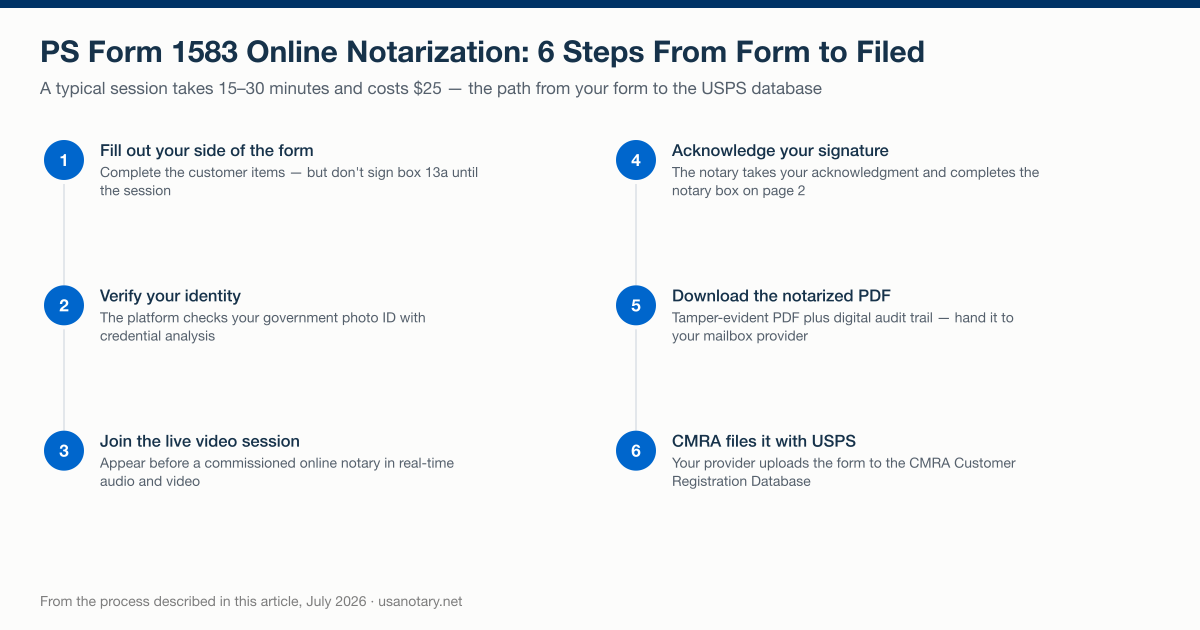
The six steps of the online notarization lane for PS Form 1583 described in this guide, checked October 2026.
The legal footing has two layers. USPS supplies the first: its rule lets the applicant acknowledge a signature in the virtual presence of a notary commissioned in a U.S. state, territory, possession, or the District of Columbia. State law supplies the second: a notary’s authority to act remotely comes from the state that commissioned them, and the National Association of Secretaries of State reports that “47 states and the District of Columbia have a law that allows for remote e-notarization” (NASS). The Uniform Law Commission’s Revised Uniform Law on Notarial Acts (2021) is a model act that “authorizes remote online notarization and remote ink notarization through the use of audio-visual recording and identity-proofing technology.”
Two federal points sit beside those layers. The ESIGN Act, 15 U.S.C. § 7001(a), provides that for a transaction in or affecting interstate or foreign commerce, a signature, contract or other record “may not be denied legal effect, validity, or enforceability solely because it is in electronic form.” And the SECURE Notarization Act (H.R.1777), which would set national standards for remote notarization, was introduced on March 3, 2025 and had not been enacted as of the Government Publishing Office’s bill-status record, last updated April 1, 2026.
On USA Notary, online notarization costs $25 per document, and the consumer service covers signers in all 50 states. The platform verifies your identity, including credential analysis of your government-issued photo ID. You appear on live video with a commissioned online notary, who takes your acknowledgment and completes the notary box. The session produces a tamper-evident notarized PDF and digital audit trail that you download and hand to your mailbox provider. Notary commissioning law is a separate, per-state matter: some states do not yet authorize their own notaries to perform RON, which is why the online notary you connect with may be commissioned in a different state than yours. The step-by-step walkthrough covers ID verification and the video session, and you can notarize your Form 1583 online in one sitting.
One caution stands apart from the notarization itself: acceptance of a remotely notarized 1583 depends on the mailbox provider, not on USA Notary. Ask your provider before your session so the verified form you produce is the version they will file.
Can a non-U.S. resident complete Form 1583?
Yes. USPS’s rules and the June 2024 form both anticipate applicants outside the United States, which matters to foreign founders and expats setting up a U.S. mailing address. Three things say so:
- USPS lists foreign passports as acceptable photo ID. The form’s checklist says “Passport” with no U.S.-only qualifier, and DMM 608.10.3 settles the question: “Passport: This includes a U.S. passport, U.S. passport card, or foreign passport.” The CMRA User Guide’s ID table likewise lists “U.S. Passport” and “Foreign Passport” as separate photo-ID types. The form’s list also includes the Matricula Consular, a consular-issued ID.
- The address fields include Country boxes. The applicant’s home address (box 4j), the address-ID address (box 9f), and the authorized individual’s address (boxes 5j and 11f) each provide a country field, and the address ID you present must contain the address you list there.
- Foreign businesses are contemplated too. Footnote 8 defines a business’s place of registration as “the county and state (if domestic), or the country (if foreign).”
One caution bounds all three: the CMRA — not you — is the acceptance gatekeeper. Under DMM 508.1.8, “the CMRA owner or manager must verify the documentation to confirm that the addressee resides or conducts business at the permanent address shown on PS Form 1583” — so confirm with your provider which foreign documents it will accept before you file.
USPS does not require the applicant to be in the United States; it requires that the notary be commissioned in a U.S. state, territory, possession, or the District of Columbia. An online session can connect you to a U.S.-commissioned notary from abroad, which is why expats and travelers use it to open a U.S. mailbox without flying home. Some states attach conditions when the signer is outside the United States, and our guide to notarizing U.S. documents while living abroad explains them. For the address-side steps — mailbox versus registered agent, the IDs a non-resident can produce, and what the operator does with the form — see our guide to getting a US address as a non-resident. USA Notary’s founder, Andrew Ray Yon, MBA, ChFC, has been a Certified Notary Signing Agent since 2005 and has personally completed more than 10,000 notarizations.
If you would rather handle it in person and are checking counter options, note that the Post Office does not provide notary services: USPS is a federal institution and notary public licenses are issued by the states (PandaDoc Notary). You would need a notary at a bank, shipping store, or law office instead. Wherever you notarize it, the ID rules and the acknowledgment on the form stay the same.
Spouses, minors, businesses, and protected individuals
PS Form 1583 has one-per-person rules and a handful of special cases, all set out on the form and in DMM 508.1.8:
- Spouses. The DMM states that spouses must each complete and sign a separate PS Form 1583. A shared family mailbox means two forms, two ID sets, and — if a notary is used — two acknowledgments.
- Each adult in the household. Footnote 3 requires a separate 1583 for each adult using the PMB for residential use, not just spouses.
- Minors. A parent or guardian may receive a minor’s mail by listing the minor’s name on their own form — the minor’s ID is not required (footnote 13).
- Businesses. An officer must sign the application and provide their title (footnote 14), box 7 captures the business details, and box 12 lists each member receiving mail at the PMB. Each person listed must, upon request, present two forms of valid ID to the Postal Service. USPS’s 2023 final rule states that the applicant on PS Form 1583 “is always an individual,” so an officer signs as the applicant and the entity is named in box 7. Our guide to who signs Form 1583 for an LLC or corporation walks through boxes 7 and 12.
- Protected individuals. Box 4k asks whether the applicant is a court-ordered protected individual; if yes, a copy of the court order must be attached. The form’s Privacy Act statement adds that information about an individual who files a protective court order will not be disclosed except by order of a court and with USPS General Counsel approval.
Common mistakes that get a PS Form 1583 sent back
Each of these traces to a specific rule on the form or in the DMM — and each one costs a second session or a re-signed form. The companion guide to why Form 1583 gets rejected maps every cause to its box and its fix:
- Using a driver’s license for both IDs. Footnote 10 limits it to one slot — photo ID or address ID, never both.
- Address mismatch. The home address in box 4f must match the document presented as the address ID (footnote 4). DMM 508.1.8.3 tells the CMRA: “If information on the application does not match the identification, the CMRA must deny the application.” The test is the match, not recency: USPS’s 2023 final rule says an applicant new to an area may present an address document “from a prior address” as long as the address on the application matches it.
- Presenting an address document that isn’t on the list. Utility bills are not among the acceptable address IDs on the June 2024 form; use a lease, insurance policy, mortgage or deed of trust, vehicle registration, or voter card.
- Signing box 13a without a verifier present. The USPS text has you “sign or confirm” your signature before the CMRA or “acknowledge” it before a notary, in physical or virtual presence, so a signature made earlier still needs that confirmation or acknowledgment. The simplest route on an online notarization is to leave box 13a blank and sign during the session.
- Missing ID copies. Footnote 9 requires copies of both ID documents attached; the CMRA must upload legible copies to the USPS database.
- Business form signed without an officer’s title. Footnote 14 requires an officer to sign and provide his or her title for business/organization use.
- One form for two spouses. DMM 508.1.8 requires each spouse to complete and sign their own 1583.
- An outdated edition. The current form is PS Form 1583, June 2024 — the edition that carries the virtual-presence language. Download it fresh from USPS rather than reusing an old copy.
What happens after your 1583 is notarized?
Once your signature is verified, the CMRA takes over the filing. Per the form’s instructions, the agent uploads the original completed, signed PS Form 1583 to the Postal Service’s CMRA Customer Registration Database and retains the completed signed copy at the CMRA business location — DMM 508.1.8 specifies at minimum a digital copy, available at all times for examination by the postmaster (or a designee) and the Postal Inspection Service. The Postal Service may also run verification procedures to confirm you actually reside or do business at the address you listed and that the IDs in boxes 8–11 are valid.
Neither the form nor DMM 508.1.8 sets a renewal interval, but the form does not stay static either. The agreement you sign commits you to file an updated application whenever any information required on the form changes or becomes obsolete — a move, a name change, a new authorized individual — and DMM 508.1.8.3 says the addressee “must complete a new application with the CMRA” when any required information changes. Our guide to when a new Form 1583 is required lists the triggers. And when you close the box, the DMM requires the CMRA to write the termination date on its copy and retain it for a minimum of six months. On the provider’s side, the quarterly certification cycle is why mailbox companies chase customers whose ID documents are about to expire: the CMRA must certify in the registration database that no identification on file has lapsed, and USPS says the database “will automatically notify the CMRA when a photo identification document entered has expired” (88 FR 32112). The CMRA compliance checklist covers that cycle from the operator’s side.
Your job ends when you hand the mailbox company a fully completed, verified form — so confirm the ID details and the verification lane up front, and your provider can activate the box without a second round of paperwork.