
Does a Form I-9 need to be notarized?
No. Form I-9, Employment Eligibility Verification, is not notarized — and it never has been, even for fully remote hires. This is one of the most common misconceptions in document handling: people search for a “notary to notarize an I-9,” but the form calls for no notarial act at all. What Section 2 requires is that an authorized representative of the employer examine the new employee’s identity and work-authorization documents, then complete and sign the form. No oath is administered, no signature is acknowledged, and no notary seal appears anywhere on the page.
USCIS settles the question directly in its Section 2 guidance: “If you choose to use a notary public as an authorized representative, that person is not acting in the capacity of a notary… When acting as an authorized representative, a notary public should not provide a notary seal on Form I-9.”
If that sounds unlike a notarization, it’s because it isn’t one. A notarization certifies something about a signer — their identity, or that they swore an oath. Section 2 of Form I-9 instead documents that a designated person reviewed an employee’s paperwork. Understanding what a notarization actually certifies is the fastest way to see why the I-9 sits outside that category entirely.
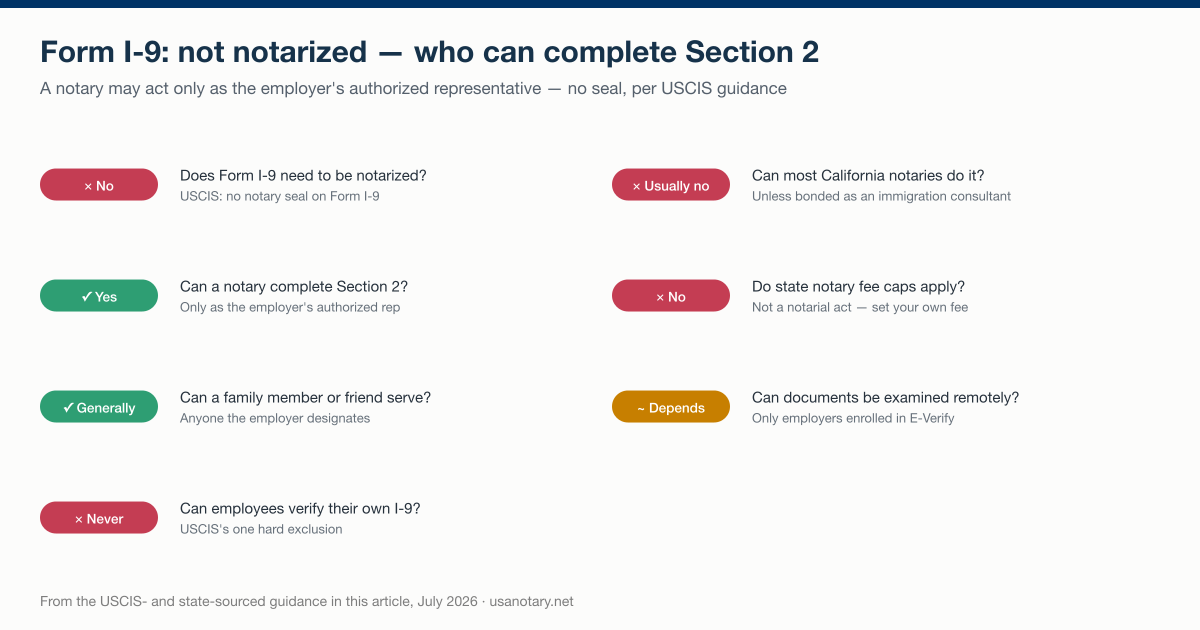
The seven verdicts from the USCIS and state guidance covered in this guide, July 2026.
What Form I-9 is — and who actually needs one
Form I-9 is the federal employment eligibility verification form issued by U.S. Citizenship and Immigration Services (USCIS). Per the USCIS Handbook for Employers M-274, an employer “must complete Form I-9 each time you hire any person to perform labor or services in the United States in return for wages or other remuneration” — and “remuneration” is anything of value exchanged for the work, including food and lodging. The requirement applies to every employee hired in the United States after November 6, 1986.
The form has two working parts. The employee completes Section 1 — their personal information and an attestation of citizenship or immigration status — at the time of hire. The employer or its authorized representative completes Section 2, the document-examination side that generates all the notary confusion.
Just as important is who does not need an I-9. Per the M-274 handbook, employers do not complete Form I-9 for people who are:
- Independent contractors — no employment relationship, no I-9;
- Employed for casual domestic work in a private home on a sporadic, irregular, or intermittent basis;
- Provided by a contractor or leasing/temp agency — the contracting agency, as the actual employer, handles the I-9;
- Not physically working in the United States or its territories;
- Hired on or before November 6, 1986 and continuing in that employment.
Self-employed people also do not complete an I-9 on their own behalf — unless they are an employee of a separate business entity such as a corporation or partnership, in which case the entity verifies them like any other employee.
Where the confusion comes from: the authorized representative
The mix-up starts with remote hiring. An employer often can’t sit across a table from a new hire in another city or state, so federal rules let the employer designate someone else — an authorized representative — to handle Section 2 in person on the employer’s behalf. Because notaries are widely available, commissioned, and used to checking IDs, a remote employee is frequently told to “find a notary.” The employee then assumes the notary will notarize the form. They won’t. The notary is standing in as the authorized representative, doing exactly what any other representative would do.
USCIS draws this line explicitly in its Section 2 guidance: the notary “is not acting in the capacity of a notary” and “should not provide a notary seal on Form I-9.” Stamping the form is precisely what USCIS says not to do. The National Notary Association gives working notaries the same instruction, adding a practical tip: when an employer’s email tells a new hire to take the I-9 to a notary, the notary should ask for a copy of that email and keep it as a record that they acted on the employer’s request.
Can a notary complete a Form I-9?
Yes — but as an authorized representative, not as a notary. USCIS defines the pool of eligible representatives broadly: the representative “can be any person you designate, hire, or contract with… such as personnel officers, foremen, notaries public, agents, or anyone acting directly or indirectly in your agent’s interest.” A notary qualifies simply as one available “any person,” with no special authority attached to their commission. USCIS also confirms the employer is “not required to have a contract or other specific agreement” with the representative — a designation is enough. The moment a notary agrees to complete an I-9, they set the notarial role aside and take on the employer’s verification duties.
Practically, that means the notary must perform the same actions any HR clerk or manager would, and must sign as the person completing Section 2 — writing “authorized representative,” not “notary public,” in the title field. If a notary tries to add a jurat, an acknowledgment, or a seal, they are documenting an act that didn’t happen — which is why USCIS forbids the seal outright. (In an actual notarization, an acknowledgment means the signer acknowledges signing, and a jurat means the signer swears the contents are true and signs in front of the notary — neither happens on an I-9.)
Notarizing vs. acting as an authorized representative
| Notarizing a document | Completing an I-9 as authorized rep | |
|---|---|---|
| Who may do it | A commissioned notary | Any person the employer designates |
| Notary seal used? | Yes | No — USCIS says do not seal |
| What is verified | The signer’s identity (and, for a jurat, a sworn oath) | The employee’s List A / List B + C documents |
| Governing authority | State notary law | Federal immigration law (INA / USCIS) |
| Signature block title | Notary public, with commission details | “Authorized representative” |
| Fee | Capped by state notary fee schedules | Set freely — not a notarial act |
| Recorded in the notary journal? | Yes, where required | No — NNA says keep a separate record |
| Applies to Form I-9? | No | Yes |
| Who bears liability | The signer/parties | The employer, for the rep’s errors |
What the authorized representative actually does
Section 2 is a document-review task, not a notarization. According to the USCIS Section 2 instructions, the representative must:
- Examine the original documents the employee presents — either one document from List A, or one document from List B (identity) plus one from List C (work authorization). List A alone proves both identity and work authorization, so don’t ask for more; likewise, an acceptable List B + C combination means no List A document may be demanded. Documents must be original and unexpired — with one exception USCIS names: certified copies of birth certificates are acceptable. In certain cases an employee may present an acceptable receipt for a List A, B, or C document.
- Confirm each document reasonably appears genuine and relates to the person presenting it. If a document doesn’t pass that test, the employee must be allowed to present other documentation from the Lists of Acceptable Documents.
- Record the details — document title, issuing authority, document number (if any), and expiration date (if any) — exactly as they appear.
- Enter the employee’s first day of employment and the date the documents were examined.
- Print, sign, and date as the person completing Section 2, and enter the employer’s business name and physical address (a P.O. box is not allowed).
- Return the original documents to the employee. No seal, no notarial certificate.
One E-Verify wrinkle: if the employer participates in E-Verify and the employee presents a List B + List C combination, the List B document must contain a photograph.
The deadline: 3 business days
Timing is strict. USCIS requires Section 2 to be completed within 3 business days of the date of hire — the employee’s first day of work for pay. Its own example: “if your employee began work for pay on Monday, you must complete Section 2 by Thursday of that week.” If the job lasts less than 3 days, Section 2 must be completed no later than the first day of work for pay. Section 1 has its own clock: the employee completes it at the time of hire, and may complete it earlier — but never before accepting the job offer.
Getting the dates right
Section 2 asks for two dates, and USCIS allows the “first day of employment” to be a current, past, or future date depending on when the form is completed. If Section 2 is filled out after the offer is accepted but before work begins, the representative enters the expected start date — and if the employee actually starts on a different day, the correct procedure is to cross out the expected date, write in the correct one, then date and initial the correction. The second date — when the documents were examined — is always the actual day the representative reviewed them and signed.
State rules that change the picture: California, Texas, and Pennsylvania
Federal law defines who may complete Section 2, but state notary law controls what a notary may do — and a few states have issued specific guidance that every remote hire and every notary should know before booking an appointment.
| State | Can a notary complete an I-9? | Key rule |
|---|---|---|
| California | Usually no | Notaries not qualified and bonded as immigration consultants may not complete Form I-9, even in a non-notarial capacity |
| Texas | Yes, without seal | May not notarize an I-9; a notary employee may assist their own employer, outside the notary capacity, with no seal |
| Pennsylvania | Yes, without title or seal | “No notary title or seal should be used to complete the I-9 as an authorized representative” |
| Most other states | Yes, as authorized rep | Follow USCIS rules: no seal, sign as authorized representative |
California is the big exception. The California Secretary of State treats Form I-9 as an immigration form, and per guidance reported by both the National Notary Association and the American Society of Notaries, California notaries who are not also qualified and bonded as immigration consultants under Business and Professions Code Sections 22440–22449 may not complete or make the certification on Form I-9 — even in a non-notarial capacity. The statutory hook is California Government Code Section 8223, which provides that a notary who is not qualified and bonded as an immigration consultant “may not enter data provided by a client on immigration forms.” A California remote hire should plan on a non-notary authorized representative — a manager, colleague, or trusted adult — or a bonded immigration consultant.
Texas took a softer line. In 2019, the Texas Secretary of State’s notary FAQ clarified that while Texas notaries may not notarize I-9 forms, a notary who is an employee of a business may assist that business in filling out an I-9 — as long as the work is not performed in their capacity as a notary and no notary seal is placed on the document.
Pennsylvania allows its notaries to serve as authorized representatives but is emphatic about the boundary. Per the Pennsylvania Department of State, “no notary title or seal should be used to complete the I-9 as an authorized representative.” The department also warns against a workaround some employers request — a separate, notarized “acknowledgment form” referencing the I-9 statements. That fails because a notary may not notarize their own signature or statement under Pennsylvania’s notary law, which is based on the Revised Uniform Law on Notarial Acts (RULONA).
Who can be an authorized representative — and who is on the hook
Almost anyone can serve: a notary, a friend, a family member, a manager at a nearby branch, or a third-party agent. The one hard exclusion is the employee themselves — per USCIS, “employees cannot act as authorized representatives for their own Form I-9.” That rules out having a new hire verify their own documents or attest to the authenticity of the documentation they present.
The catch employers should not miss: designating a representative does not shift responsibility. USCIS states the employer remains “liable for any violations in connection with the form or the verification process, including any violations of the employer sanctions laws, committed by the authorized representative acting on your behalf.” Choosing a notary can add a layer of care — they check identification documents for a living — but it does not transfer legal exposure away from the employer.
Remote hires: how I-9 documents get examined from a distance
The I-9 review is not a notarization, so it also isn’t covered by remote online notarization technology. Physical examination of documents is the default rule. Per USCIS, “employers must physically examine documents, except, employers that participate in E-Verify may use an alternative procedure authorized by the Secretary of DHS to remotely examine documents.” Employers using that alternative procedure must check a box in the Additional Information field of Section 2. A remote hire therefore lands in one of two lanes:
- Employer participates in E-Verify — the employer may use the DHS-authorized alternative procedure and examine your documents remotely. No notary, no representative, no in-person meeting required.
- Employer does not participate in E-Verify — someone must physically inspect your original documents within the 3-business-day window. The employer designates an authorized representative near you: a notary willing to take the role (outside California, in most cases), a family member or friend who isn’t you, or a colleague at a nearby office.
Do not confuse either lane with online notarization. On USA Notary, remote online notarization is a consumer service that is legally valid in all 50 states, costs $25 per document, and has the signer appear on live video before a commissioned notary. It applies to documents that genuinely require a notarial act — not to the I-9.
If you’re the notary: how to handle an I-9 request
Notaries field I-9 requests constantly, and the professional associations have converged on the same playbook:
- Confirm the ask. The NNA advises asking the employee for a copy of the employer’s instruction email and keeping it, so there’s a record that you acted within the employer’s request. If no instructions accompany the form and the employer can’t be reached, there is no law prohibiting you from completing it — as long as it is clear you are acting as an authorized representative, not as a notary.
- Sign in the right capacity. Write “authorized representative” in the Section 2 title field — never “notary public,” and never with your seal or commission details. The American Society of Notaries puts it bluntly: the form “does NOT require a notarial act, therefore you must NOT affix your notarial seal impression on it.”
- Keep the record outside your journal. Because this is not a notarial act, the NNA says not to log it in your journal of notarial acts. Track it separately — employee name, requesting company, and completion date.
- Set your own fee. State-mandated notary fee schedules apply to notarial services. Completing an I-9 isn’t one, so you may charge what the non-notarial service is worth — agree on it up front.
- Know your state. California notaries who aren’t bonded immigration consultants must decline. Pennsylvania and Texas notaries may assist, without title or seal.
If you’re weighing this kind of non-notarial side work against your core commission duties, it helps to be fluent in how notarizing a document normally works — the contrast is exactly what keeps you out of trouble on an I-9.
When you actually do need a notary instead
Plenty of hiring and onboarding paperwork does require notarization — just not the I-9. If a document needs a signer to acknowledge signing or to swear its contents are true, that is a real notarial act. Common examples include sworn affidavits, a power of attorney, and other business and employment documents. For those, you can notarize the document online with a commissioned notary on live video, instead of tracking down an in-person appointment.
The bottom line
If someone tells you to “get your I-9 notarized,” what you actually need is an authorized representative to complete Section 2 — a role a notary can fill in most states, without notarizing and without a seal. The distinction is not a technicality: USCIS built it into its official guidance, California prohibits most of its notaries from touching the form at all, and the employer stays liable for the result no matter who signs. Save the notary’s seal for documents that truly require a notarial act, and handle the I-9 as the document review it is.