
Why was your USPS Form 1583 rejected?
A rejected USPS Form 1583 traces to a rule printed on the form or in DMM 508.1.8, and five rules cover the causes this guide maps: a home address that doesn’t match the address-ID document, an expired or unlisted ID, a driver’s license doing double duty as both IDs, an incomplete notary or witness section, or an outdated form edition. Every one of those checks comes from the form’s own printed instructions or from DMM 508.1.8 — the Domestic Mail Manual section that governs commercial mail receiving agencies — which means every rejection has a specific box, a specific rule behind it, and a specific fix. The slowest step is usually having the signature verified again, and an online session shortens it.
This guide maps each rejection cause to the exact spot on the June 2024 form and tells you which party — you, the notary, or the mailbox company — corrects it. It assumes you’ve already filled the form out once. If you’re starting from a blank form, use the field-by-field guide to notarizing PS Form 1583 instead — this article covers only what went wrong and how to make it right.
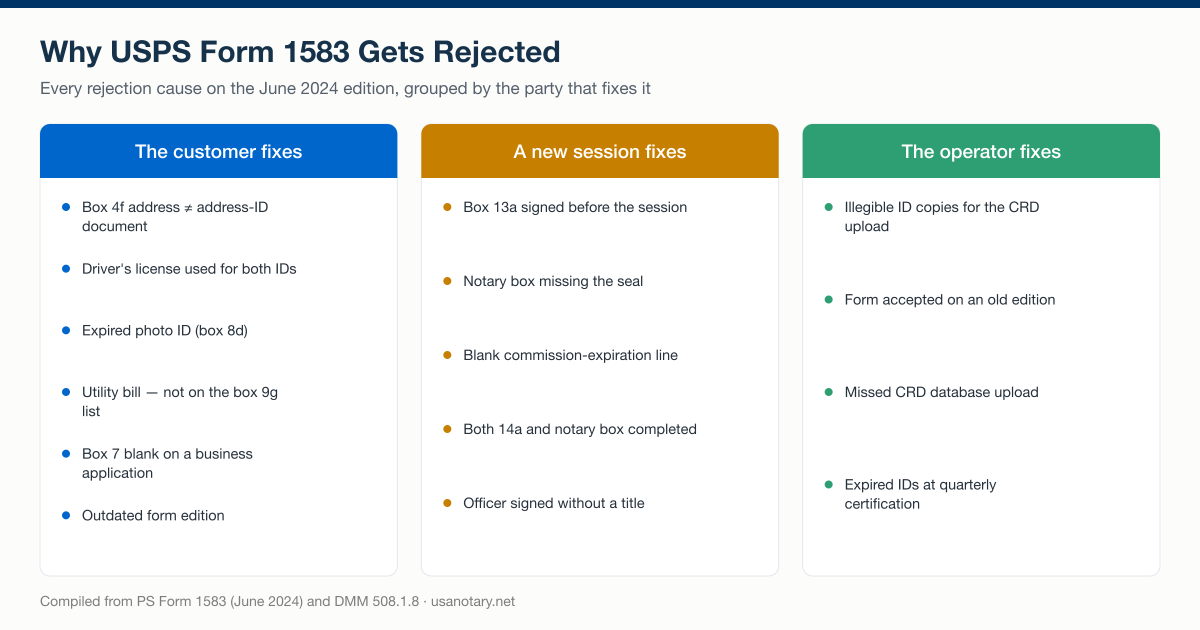
Every rejection cause on the June 2024 form, grouped by the party that corrects it — compiled from PS Form 1583 and DMM 508.1.8, checked October 2026.
USPS wording checked October 1, 2026, against the June 2024 form and DMM 508.1.8 (the PDF edition headed “Updated 7-12-26”). The primary sources are listed at the bottom of the page.
Who rejects a Form 1583 — USPS or your mailbox provider?
Your mailbox provider is usually the party that rejects the form, and USPS is the reason it must. Under DMM 508.1.8, the CMRA “must enter the information provided on each PS Form 1583 and upload a clear and legible copy of each identification document into the USPS CMRA Customer Registration Database (CRD).” A provider that accepts a defective form owns the defect — the DMM requires a CMRA with no valid 1583 on file for an addressee to return that person’s mail to the Post Office endorsed “Undeliverable, Commercial Mail Receiving Agency, No Authorization to Receive Mail for this Addressee.”
The form’s own agreement page states the consequence on the operator side plainly: “Failure to comply will subject the agency to withholding of mail from delivery until corrective action is taken.” A CMRA that files non-compliant 1583s risks mail service for its whole operation, not just one box — which is why providers screen incoming forms strictly and bounce anything that would fail a CRD upload or a Postal Inspection Service examination. Our explainer on what qualifies as a CMRA covers why mailbox companies carry these duties. The operator’s side of the rules is in the USPS CMRA requirements compliance checklist.
USPS itself can also flag an application after acceptance. The form warns that the application “may be subject to verification procedures by the Postal Service” to confirm that the applicant actually resides or conducts business at the home or business address listed in box 4f or 7c, and that the identifications listed in items 8–11 are valid. So a rejection reaches you through one of two doors: the provider’s compliance screen before the CRD upload — the common case, and the fastest to fix — or Postal Service verification afterward.
Which ID problems get a Form 1583 rejected?
ID rules take the most space in the form’s instructions — four of its fifteen footnotes (9, 10, 11, and 12) govern IDs. The baseline rule, from footnote 9: two types of identification are required, one must be a government-issued photo ID, the second must confirm the address listed on the form, and a copy of both documents must be attached. DMM 508.1.8 adds the freshness requirement: “The identification presented must be current (not expired).”
Here is what the June 2024 form actually accepts, side by side:
| Photo ID — box 8e (pick one) | Address ID — box 9g (pick one) |
|---|---|
| U.S. state/territory/tribal driver’s or nondriver’s ID card* | U.S. state/territory/tribal driver’s or nondriver’s ID card* |
| Uniformed Service ID | Current lease |
| Passport | Home or vehicle insurance policy |
| Certificate of Naturalization | Mortgage or deed of trust |
| U.S. Access Card | Vehicle registration card |
| Matricula Consular | Voter card |
| U.S. Permanent Resident Card | — |
| U.S. University ID card | — |
| NEXUS card | — |
*One slot only — see the trap below.
The driver’s-license trap
A driver’s license entered as both IDs is rejected on the form’s own terms. Footnote 10 is explicit: although the driver’s/nondriver’s ID appears on both lists, it “may be used for only one of the IDs (either photo ID or address ID), not for both.” This is the easiest rejection to walk into, because the license genuinely does prove both identity and address — the form simply refuses to let one document fill two slots. The fix is one additional document from the box 9g list: a current lease, an insurance policy, a mortgage or deed of trust, a vehicle registration card, or a voter card.
Documents that aren’t on the list
Utility bills and bank statements appear nowhere on the June 2024 form’s address-ID checklist, no matter how many older guides recommend them. Box 9g names exactly six acceptable documents, and it adds a condition in its own heading: the document “Must Contain the Address in 9b–9f.” A document that’s the right type but shows an old address fails the same check. Swap the unlisted document for a listed one showing your current home address, and this rejection disappears.
Expired IDs
An expired photo ID is rejected under DMM 508.1.8, which requires the identification presented to be current. The form is built to catch this: box 8d records the expiration date printed on your photo ID, so an expired document is visible on the face of the application — to the provider, to the notary, and to any postal inspector who later examines the file. Renew the ID or present a different document from the box 8e list.
The address-match rule
The home address in box 4f must match the document you present as your address ID — footnote 4 says simply, “Address must match document provided in item 9b.” A lease showing your previous apartment, an insurance policy listing a different street spelling, or a box 4f entry that quietly lists the mailbox address instead of your real home address all fail this check. Enter your actual current home address in box 4f, and present an address document that contains it.
Which box errors get a Form 1583 rejected — and who fixes each one?
Box errors cluster in four places on the June 2024 form: box 4f (the home address), box 7 (business information), box 13a (a premature signature), and the verification boxes on page 2. This table maps every common rejection cause to its location, its fix, and the party who performs the fix:
| Rejection cause | Where on the form | The fix | Who fixes it |
|---|---|---|---|
| Home address doesn’t match the address ID | Box 4f vs. box 9b (footnote 4) | Correct box 4f or present a listed document showing that address | Customer |
| Driver’s license entered as both IDs | Boxes 8e + 9g (footnote 10) | Add a second document from the box 9g list | Customer |
| Expired photo ID | Box 8d; DMM 508.1.8 | Present a current ID from the box 8e list | Customer |
| Address document not on the list | Box 9g | Replace the utility bill or bank statement with a listed document | Customer |
| Box 7 blank on a business application | Box 3 + footnote 2 | Complete boxes 7a–7i, including place of registration | Signing officer |
| No officer title on a business signature | Box 13a + footnote 14 | An officer signs the application and provides their title | Signing officer |
| Box 13a signed before the session | The form’s presence rule | Sign or confirm again in the physical or virtual presence of the CMRA or notary | Customer + verifier |
| Notary box incomplete or missing a seal | Page 2 notary block (footnote 15) | New acknowledgment session; the notary completes the box | Notary |
| Missing or illegible ID copies | Footnote 9; DMM 508.1.8 | Attach clear copies of both documents for the CRD upload | Customer + CMRA |
| Outdated form edition | Edition line, both pages | Redo the form on PS Form 1583, June 2024 | Customer |
Box 7: the business-application gap
Box 7 is required whenever box 3 is checked “Business/Organization Use” — footnote 2 makes the link directly. A business application with box 7 blank, or with box 7i (place of registration) skipped, is incomplete on its face. Footnote 8 defines what 7i wants: “the county and state (if domestic), or the country (if foreign).” Footnote 14 adds the signature rule that trips up teams: for business use, “an officer must sign the application and provide his or her title” — an office manager’s signature without a title line doesn’t satisfy it. The full mechanics of entity applications — who signs, how additional recipients are listed in box 12 — are covered in our guide to Form 1583 for a business or LLC.
Box 13a: the premature signature
A pre-signed box 13a defeats the entire verification step. The form’s instructions require the applicant to “sign or confirm their signature in the physical or virtual presence (in real-time audio and video)” of the CMRA or its authorized employee, or to acknowledge the signature the same way before a notary public. A form signed at the kitchen table the night before satisfies neither path. The fix costs nothing but a redo: at the session, the verifier has you sign fresh or confirm the existing signature on camera or in person.
Why does the notary section get a Form 1583 rejected?
The notary section is rejected when the acknowledgment block on page 2 arrives incomplete — a missing seal, a blank commission-expiration line, an empty county or applicant-name field — or when the form’s two verification paths get crossed. The block the notary must complete reads, in the form’s own words: the applicant “who proved to me on the basis of satisfactory evidence to be the person whose name is subscribed to the application, appeared before me, and acknowledged their signature.” Next to it sits a labeled “Official Seal” box. A certificate with any of those elements blank is not a completed acknowledgment, and a provider cannot upload it as one.
The crossed-paths error comes from footnote 15: “The agent or an authorized employee may sign item 14a. If the Notary Public box at the bottom of page 2 has a seal, the Notary Public completes the box.” One path or the other applies — either the CMRA witnesses the signature and signs box 14a, or a notary takes the acknowledgment and completes the page 2 block. The USPS text does not describe completing both, and a form with neither completed shows no signature verification at all. The notary also must be commissioned in “a United States state, territory, possession, or the District of Columbia” — any one of those commissions works, regardless of which state the mailbox sits in.
The online fix for a failed notary section
A failed notary section is fixed fastest online, because the June 2024 form authorizes the acknowledgment in the “virtual presence (in real-time audio and video)” of a notary — remote online notarization fits the form’s own language, and the National Association of Secretaries of State reports that 47 states and the District of Columbia have a law allowing remote e-notarization. In a remote online notarization session, the platform verifies your identity first, then a commissioned notary takes your acknowledgment on live video and completes the page 2 block in full: venue, date, name, signature, commission expiration, and seal. Sessions run 24/7, take 15–30 minutes, and produce a tamper-evident PDF with a complete audit trail — a record your provider can upload without squinting at a faint embossed seal.
Is your Form 1583 the current edition?
The current edition is PS Form 1583, June 2024 — the edition line prints at the bottom of both pages, next to the form number. It is the edition that carries the virtual-presence notarization language, the box 8e and 9g ID checklists, and the CRD upload instructions quoted throughout this article. Guides written earlier reference earlier editions, and a template saved from one of them can arrive at your provider with boxes that no longer line up with what the compliance screen expects.
The fix is the simplest on this page: download the form fresh from USPS at about.usps.com/forms/ps1583.pdf every time you complete one, and check the edition line before you fill in a single box. The CMRA must enter “the information provided on each PS Form 1583” into the USPS CMRA Customer Registration Database, and the boxes it enters are the current edition’s boxes, so a provider may refuse an older edition. The DMM text does not state an edition cutoff, so ask your provider which edition it accepts.
How do you resubmit a rejected Form 1583?
A rejected Form 1583 is resubmitted by correcting the flagged item on a fresh current-edition form, re-verifying the signature, and returning the packet to your provider — and neither the form’s instructions nor DMM 508.1.8 imposes any waiting period between rejection and resubmission. The sequence:
- Get the rejection reason in writing. Ask your provider which box, ID, or section failed. Providers screen against the same rules quoted above, so the answer is usually one specific item, not a mystery.
- Download the current edition. Start from the June 2024 form at USPS, even if only one field was wrong — a clean current form avoids stacking a second rejection on the first.
- Correct the flagged item. Fix the box 4f address, gather the substitute address document, renew the expired ID, or complete box 7 — whatever the table above prescribes for your cause.
- Verify the signature again. A corrected form is a new document, and USPS has published no rule carrying an earlier verification over to it, so plan on a fresh verification: sign or confirm before the CMRA, or acknowledge before a notary. (Where the correction is a change of required information, DMM 508.1.8 separately requires a new application.)
- Return the full packet. The corrected, signature-verified form plus clear, legible copies of both ID documents — the CMRA uploads all of it to the CRD, and an incomplete packet restarts the loop.
One boundary worth knowing: if your underlying information changed — a move, a name change, a new business address — you’re not fixing a rejection, you’re completing a new application: DMM 508.1.8.3 says the addressee “must complete a new application with the CMRA” when any required information changes. That lifecycle, including when a revised 1583 needs a fresh notarization, has its own rules and its own article.
How can mailbox operators prevent 1583 rejections at scale?
Operators can pre-screen away most rejections before anyone signs, because nearly every cause in the table above is visible on the paperwork before the verification step. Rejections cost an operator twice — once in support time on the angry email, once in a delayed CRD record — and the screen that prevents them takes a minute per application:
- Edition check: the form says “June 2024” at the foot of both pages.
- Service-type consistency: box 3 checked “Business/Organization Use” means boxes 7a–7i are complete and an officer with a stated title will sign.
- ID pairing: the driver’s license occupies one slot only; the second document comes from the box 9g list; box 8d’s expiration date hasn’t passed — and won’t pass before your next quarterly certification, since DMM 508.1.8 requires the CMRA to certify in the CRD each quarter (January 15, April 15, July 15, and October 15) that no identification documents on file are expired.
- Address match: the box 4f entry equals the address printed on the customer’s address document, character for character.
- Signature hold: box 13a stays blank until the customer is in the physical or virtual presence of your staff or a notary.
- Copy quality: both ID copies are legible enough to survive the CRD upload — the DMM’s standard is “a clear and legible copy of each identification document.”
The verification step itself is the one item an operator can’t self-serve when staff never meet the customer — and it’s the step we run. Our Form 1583 workflows for virtual mailbox operators support staff-initiated sessions: your team pre-screens the form against the checklist above, sends the customer into a notary session that runs 24/7 and takes 15–30 minutes, and receives back a tamper-evident PDF with a complete audit trail, ready for the CRD. Notarization is $25 per document with volume pricing for operators processing signups at scale, and signers can connect from all 50 states.
Fix the flagged box, redo the verification, move on
The rule to remember: a 1583 rejection is a field-level problem with a document-level fix. Find the cause in the table, correct that one item on a fresh June 2024 form, and have the signature verified again — by your provider’s staff or before a notary — because the verification belongs to the document, not to you personally. No USPS rule makes you wait, so a rejection discovered in the morning can be a compliant CRD record by the afternoon.
Operators fielding rejection tickets by the dozen can put the pre-screen checklist and a staff-initiated notary lane in place this week — call 804-767-7500 or reach us through the contact page to set it up.